
Roles Matter! In Beautiful.ai, you’re in control of how your workspace runs. As an Owner, you decide what each team member can see and do. We recommend keeping your group of admins small (assigning the Owner or Librarian role) to help manage and protect your Team Resources. The right setup means less clutter, more control, and a workspace that stays organized and efficient.
How To Add Users
Navigate to your team workspace
Click your profile icon on the top right.
Click "Manage Account" from the pop-up menu
Click "People.
Click 'Invite Members'.
In the pop-up add the users email.
Then click "Add Members" to send out the invites.
Once the invite is sent, you can scroll down to the user and select the role you wish them to have.
Once the preferred role is selected, click 'Ok'.
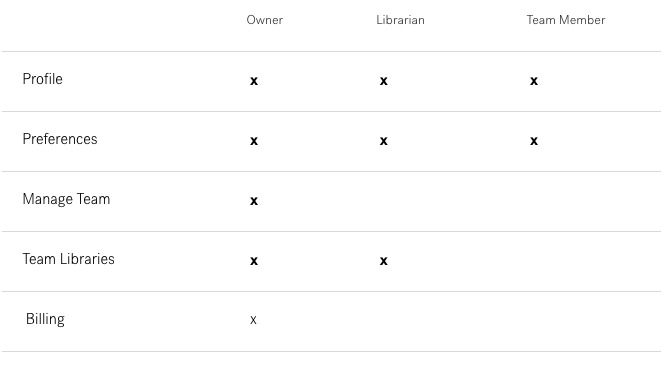
The below image is a breakdown of the permissions each role has:
Comments
Article is closed for comments.